Updated October 2026.
For a rental that residents may use for work or study, start with the space they can use and the services the building actually provides. Check the unit and the questions residents and prospects ask before spending money on an amenity.
The U.S. Census Bureau reported that 13.8% of U.S. workers usually worked from home in 2023. That national figure does not establish demand at a particular property or justify a particular upgrade. Use it as context, then check the local evidence.
1. Space that fits a work surface
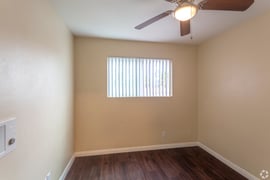
Walk each unit and measure the places where a desk could realistically fit. Check circulation, door swings, storage, and whether the space has another primary use. A usable nook may be more valuable to describe than a room labeled “office” without enough dimensions to support the claim.
Photograph the space as it is. If a built-in desk or shelving is proposed, record its cost, maintenance responsibility, and effect on other uses of the room before approving it.
2. Internet options you can verify
Document which providers serve the address, what building wiring or access is available, and whether any service is included in the tenancy. A provider serving the building does not mean every plan or advertised speed is available in every unit.
Describe the verified options. Avoid promises such as “perfect Wi-Fi” or “video-call ready.” If the property supplies internet service, explain the support and outage process in the applicable agreement and operating plan.
3. Outlets, light, and temperature control
Check outlet locations near usable work surfaces, daylight and glare, window coverings, task lighting, and how the space feels during ordinary operating hours. These details are easier to inspect and describe than a broad claim that a unit is ideal for remote work.
Get the appropriate property review before altering electrical equipment or installing fixtures. Record which items belong to the property and who handles repair or replacement.
4. Common-area access and noise
A lounge, courtyard, or shared room may be useful during the day, but only if its rules and hours fit the way it is advertised. Confirm reservation requirements, access limits, power, connectivity, cleaning, and whether other activities make the space unsuitable for quiet work.
Do not promise a quiet unit or always-available shared area when the property cannot control those conditions. Give prospects the current facts and let them decide what fits.
5. Building services that affect the day
Package handling, visitor access, parking terms, and maintenance response can matter to a resident who spends more time at home. State what the property actually provides, the hours or rules that apply, and who residents contact when something fails.
These services should be evaluated with the same discipline as a physical amenity: resident questions, operating cost, staff capacity, service records, and whether the feature can be maintained consistently.
Decide what to fund and what to say
Compare each proposed improvement with unit condition, local applicant questions, resident feedback, comparable listings, cost, useful life, and maintenance burden. Use those property records to build the budget and decide which improvements deserve funding.
In the listing, use dimensions, current photographs, included services, provider availability, and common-area rules that can be verified. Have the person responsible for the property's leasing and advertising review the description and any applicant-specific questions. Coastline's multifamily management guide explains the broader owner review, and its services page describes the management scope.
If you're weighing a unit upgrade or revising a listing, send a property management inquiry. Include the property type, location and feature you're considering.
Educational information only. This article does not guarantee demand, rent, occupancy, or resident outcomes. Review property-specific advertising, leasing, construction, and accessibility decisions through the appropriate process.




 Explore Our Services
.webp?width=300&height=200&name=charles-forerunner-3fPXt37X6UQ-unsplash-1920w%20(1).webp) Our Company
Our Company About Our CEO
 Explore Our Blog